A myriad of ways to make users sign-in

It’s amazing how many different ways web sites handle sign-in pages. The messaging of the interface, whether or not to sign up for an account, and the HTML elements used are just some of the details that change drastically from site to site. Just recently I was doing an interface review to see what the state of the art was, and I was simply boggled by the different approaches I saw.
Here’s Amazon‘s account login:
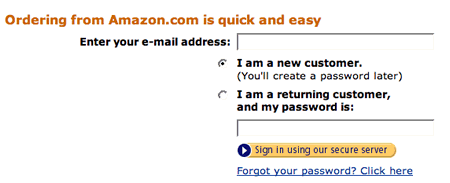
As you can see, the messaging says that ordering from Amazon is quick and easy. Placing this message here is a good idea. (unless it’s not true, of course) Then we see something rather unique, a set of radio buttons that allows the user to choose whether they are a new customer or a returning one. If they are a new customer, then they must sign up for an account. If they are returning, they need to enter their password.
We have seen users have difficulty with this particular feature in the past for several reasons. One is when registered users enter their password but neglect to click the radio buttons. The other is when new customers, after entering an email address, enter their password too, thinking that they’re going to create an account with that password. (despite the helpful text that says you create your password later)
Here’s the redesigned Circuit City web site:
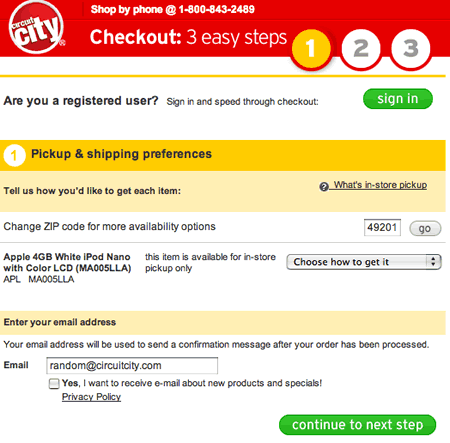
The Circuit City design starts out by asking users if they are registered, and if so they can sign in to speed through checkout. Like Amazon, the designers at Circuit City are touting the benefits of signing in, which we’ve seen as critical to getting users further along the Customer Sieve.
But, unlike Amazon’s radio buttons, the choice isn’t a clear this or that. In the Circuit City design, both registered and non-registered users need to complete the questions on this page. The only difference is that those users who are registered can click the input button labeled “sign in” first, and then they’ll be brought back to this page to continue filling it out. In effect, there is no choice between either signing in or creating an account. It doesn’t state that explicitly, however.
Contrast that to the Best Buy checkout:
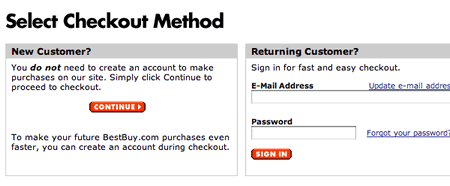
The designers at Bestbuy chose a different approach. They make it explicit that users can checkout without signing up for an account. In our testing we’ve seen users really appreciate this option. In addition, users can create an account during the checkout process to speed future purchases. You can’t tell if that’s possible on the Circuit City site. In general, we’ve seen approaches that make these details like this as clear as possible work better than those that don’t.
And then there’s Yahoo, who seem to desperately want users to create a Yahoo ID:
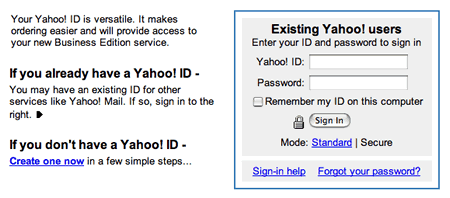
Like the others, Yahoo is providing a choice and touting the benefits of sign up: “It makes ordering easier and will provide access to your new Business Edition service”. Unlike Best Buy, however, sign-up is not optional.
I’m interested in how this plays with users. Do they want to sign up for a new business service, or do they want to simply check out this one time? While we haven’t tested this Yahoo feature specifically, our experience testing checkouts has suggested that people often shy away from “fringe benefits” like this, especially if those benefits are not explained fully. (and much moreso if they have a choice not to)
The choice that Yahoo does provide is rendered in text, instead of input buttons or radio buttons like on Circuit City and Amazon. They do it with a link called “Create one now” and a sign-in box to the right. This is similar to Amazon and Best Buy, who include the text boxes directly on the page. Circuit City, on the other hand, takes users to another screen to enter the sign-in information.
So how do you handle sign-in? As you can see, there are as many different ways to handle sign-in as there are web sites. I stuck to e-commerce sites for these examples, but the basic problem is the same for all sites: articulate the choices that users have, explain the benefits or drawbacks, and guide them through making their decision. Do your design projects take you in similar directions as these four sites, or completely different ones?